
Scribe — automated email marketing from your website content
Your website changes. SendFable builds the campaign. You choose when it sends. Try Scribe free for 3 months — 1 automatically created campaign per month.
- Their content
- Their look
- You send or schedule
harborandrye.example/specials
Harbor & Rye
Weekend Special
October 10–12 · Pumpkin latte · $4.95
In the cafe this weekend. Dine in or take it to go.
See the special
Harbor & Rye
Weekend Special
October 10–12 · $4.95
Harbor & Rye's pumpkin latte is on for the weekend.
See the special
Powered by SendFable
We turn your content into emails ready to send.
You choose
Nothing sends until you choose Send now or schedule it.
No approval. No send.
Nothing sends until you choose Send now or schedule it. Try Scribe free for 3 months. 1 creation a month during the trial.
See Scribe turn an update into a campaign
Website change → draft in your look → you choose Send now or schedule.

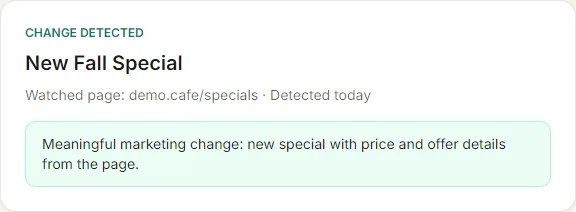
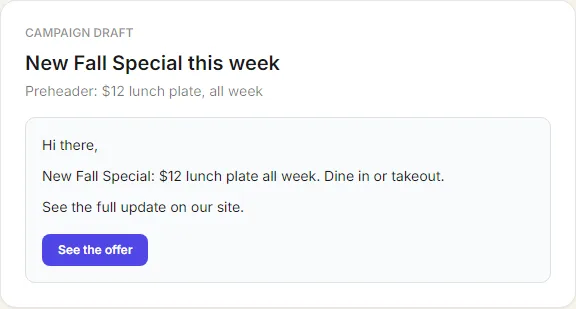

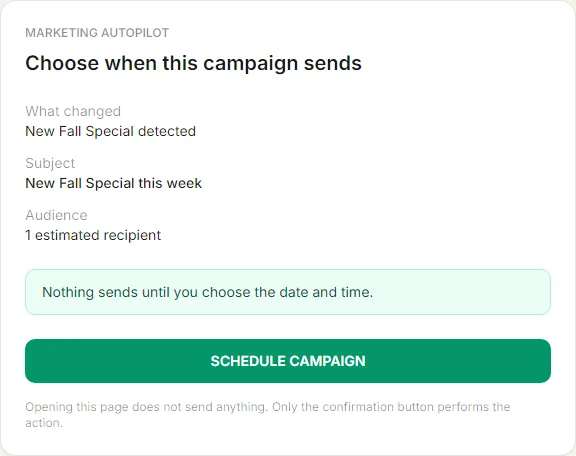

Screenshots from a controlled SendFable demo.
How it works
The email looks like your business. SendFable is the engine underneath, and it appears at the bottom only when your plan requires it.
- 1
Watch
SendFable notices meaningful content changes on the page where you already post.
- 2
Create
That content becomes a campaign with your logo, your colors, your words, and an image only when it belongs to the update.
- 3
Review
You see the finished draft. Edit it, or skip this campaign.
- 4
Send or schedule
Choose Send now or pick a date and time. Nothing sends until you do. No reply means it waits.
Built for real small businesses
Restaurant
New weekly special appears → campaign drafted for your approval.
Brewery
New beer release → campaign drafted from the release page.
Retail
New sale or product → campaign ready to review.
Real estate
New listing or open house → draft waiting in your inbox.
Salon
New promotion → polished email draft, you decide.
Nonprofit
New event or fundraiser → campaign prepared, not sent.
Local service
Seasonal offer posts → Scribe drafts, you approve.
Your content, your look, then you decide
Competitors often offer complex automation builders. SendFable's differentiator is simpler: watch the page where you already post promotions, prepare the campaign, and wait for you. Nothing sends until you choose Send now or schedule it.
Availability
- Free — no permanent Scribe. Optional 3-month trial: 1 creation per month.
- Starter ($12/mo) — 4 creations a month
- Growth ($29/mo) — 8 creations a month
- Pro ($69/mo) — 16 creations a month
- Pro Plus ($99/mo) — 30 creations a month
Will SendFable send emails without me?
Is this the same as Mailchimp-style automation builders?
What pages can I watch?
Does opening the approval email send the campaign?
Which plans include Scribe?
Does Scribe send texts too?
Fresh content in. A campaign ready for your review.
Start free. Point Scribe at one page. Nothing sends until you choose Send now or schedule it.